Symptom
Prospects remain in a "paused" state on a sequence step after attempting to manually resume or activate them.
Applies To
- Outreach Sequences
- Outreach Templates
Resolution
- Log into Outreach.
- Navigate to the sequence.
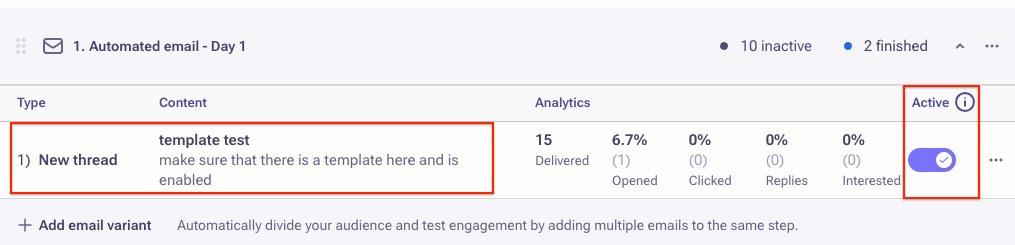
- Locate the sequence step that the prospects are paused on.
- Confirm that an enabled template with content in the email body is attached.
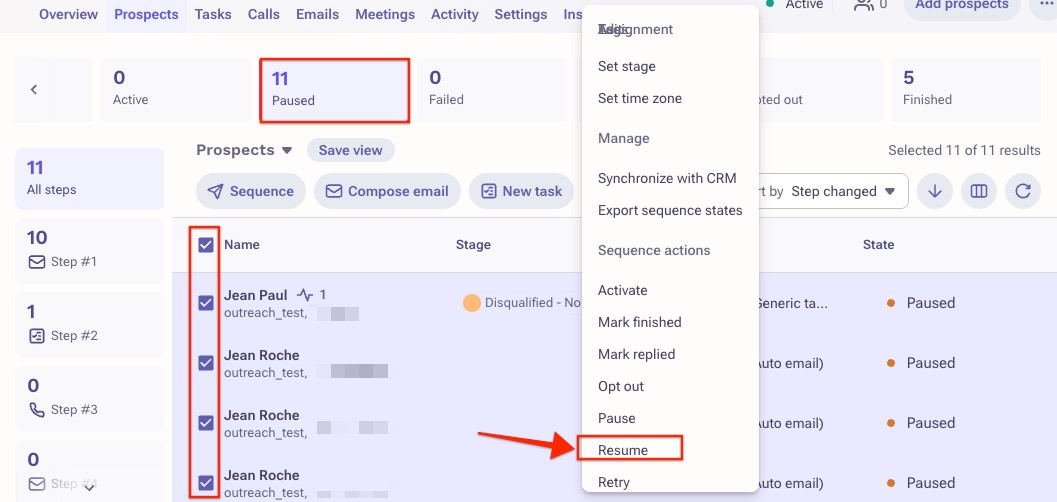
- From the Prospects Tab, select your 'Paused Prospects' and click on the '3 dots menu' then manually 'Resume' them:
Cause
When there is no template attached to the sequence step, or the template has not been enabled yet, Outreach will put the Prospects in a paused state. This is because the step is viewed as "incomplete." The content of the template can be an outline of what users should include in their message, the message written out entirely, or as minimal as a period -- there just needs to be something there for Outreach to recognize the template.
Was this article helpful?
That’s Great!
Thank you for your feedback
Sorry! We couldn't be helpful
Thank you for your feedback
Feedback sent
We appreciate your effort and will try to fix the article