Symptom
You're previewing and testing your message template, but the preview panel on the right side is not populating or loading the variables like it should.
Applies To
- Sequences
-
Templates
- Snippets
Resolution
When adding variables to messages, templates, and snippets, always make sure to use the Add Variable Feature in the editor toolbar of the message body. This ensures that you're choosing a working variable that exist in the system, and that you're using the correct format for the variable.
When using the IF statement, make sure to setup the syntax correctly, if there's a one syntax error, this might effect all the other variable in the template, even if they were written correctly.
Cause
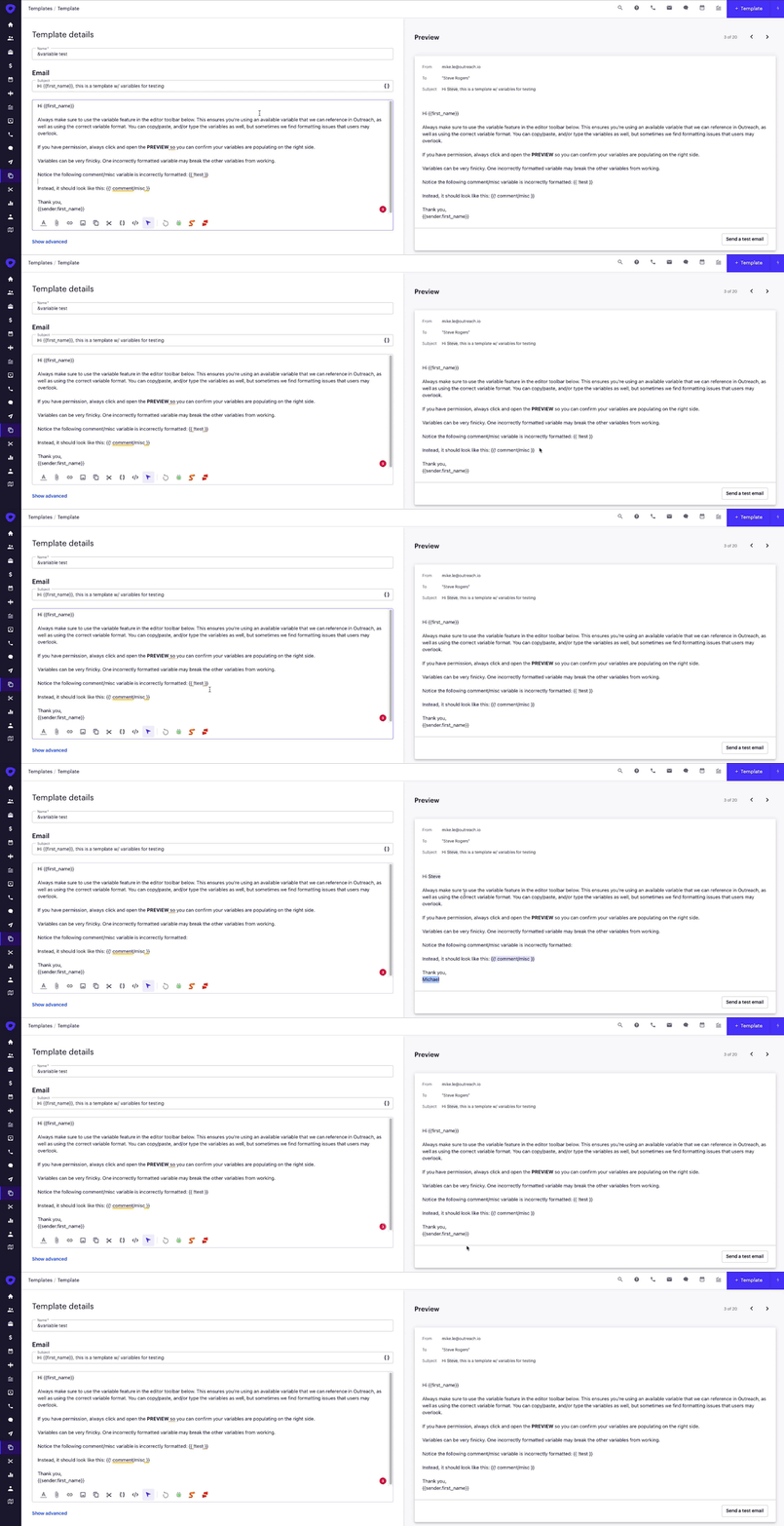
We usually see the issue of variables not loading or populating when there is an incorrectly formatted variable in the message, either in the subject line or the message body. Variables are very finicky. One incorrectly formatted variable can break and cause the other variables not to work correctly.
Notice below how one incorrectly formatted variable can cause the others not to work. By simply removing or correcting that incorrectly formatted variable, it allows the others to work correctly as well.
Was this article helpful?
That’s Great!
Thank you for your feedback
Sorry! We couldn't be helpful
Thank you for your feedback
Feedback sent
We appreciate your effort and will try to fix the article