Objective
Learn about Outreach MCP Server and how it allows other AI Agents to utilize Outreach knowledge directly inside their workflows.
Applies To
- Outreach Admins
- MCP
- Amplify Package
Overview
Summary
Outreach acts as a server (producer) of knowledge. Outreach MCP Server is built to support Anthropic's Model Context Protocol (MCP) standard and can be utilized by any MCP Client that follow the MCP standards. Any user who wants to utilize Outreach MCP Server will need to be active and licensed seat in an Outreach instance and have the Amplify add-on package enabled in their plan. If you do not have the Amplify add-on or unsure, please reach out to your AE to inquire about it.
What is MCP?
AI applications are only as useful as the knowledge they can generate from the data they have access to. The real world is a landscape of disconnected data islands, hosted in their own servers and controlled by the hosting product. For useful and usable experiences AI applications need to connect to these data sources. This is where MCP or Model Context Protocol (MCP) comes in.
MCP is an open-source standard from Anthropic for connecting AI applications to external systems for knowledge and actions that the local system doesn't have. MCP standardizes how LLMs communicate with each other. Think of MCP as context in motion – your Outreach AI can share or draw to and from the broader ecosystem of tools your company already uses, and those systems can talk back to Outreach.
You can learn more about MCP from Anthropic's official documentation.
Outreach MCP Server
In a Server capacity, Outreach is a producer of knowledge and facilitator of actions for MCP Clients. Other AI Agents, or end users, can now utilize Outreach's data and draw best in class insights directly inside their Revenue workflows.
Outreach MCP Server is available to all Outreach customers to connect to. While it's an authenticated, open Server it is expected to be most useful for MCP Clients that integrate Outreach value into their workflows and end user experiences.
Outreach envisions that customers can use Outreach exposed MCP Tools in all sorts of applications include LOB tools, open MCP Clients like Claude, OpenAI, Slack, and in chat applications like Agentforce or CoPilot.

Above is not an exhaustive list. We're constantly adding more tools through collaboration with our customers and creating innovative scenarios with partners.
Procedure
Setup
Enabling Outreach MCP Server
Note: The Amplify product add-on is required in your plan if you want to utilize the Outreach MCP Server. If you do not see the below options available to you, you may not have the Amplify add-on. You'll simply need to reach out to your AE and inquire about the Amplify add-on product.
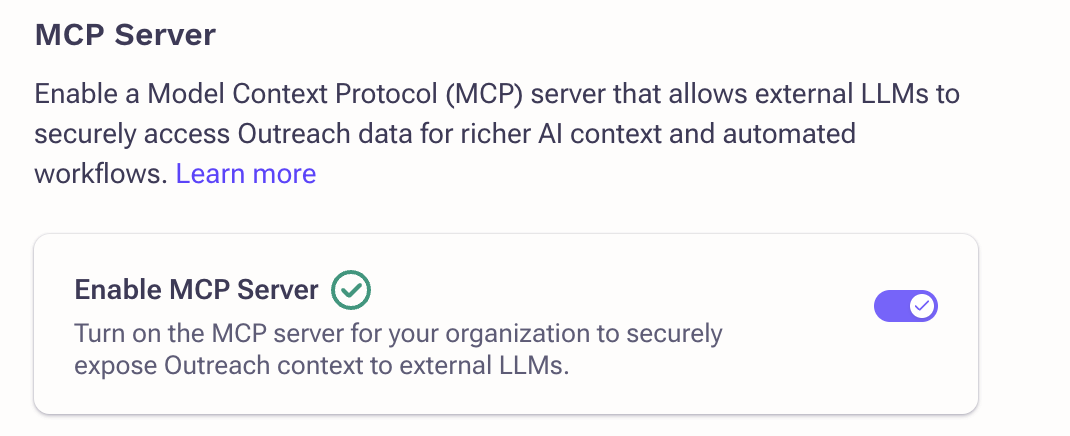
Before MCP Clients can connect to it, Outreach MCP Server will need to be enabled. This setting is per organization and only exposes the data of that specific instance. This action is only available to the organization admin.
- Log in to Outreach as an Admin.
- Click Administration > Organization > Org Info.
- Navigate to GenAI.
- Toggle on MCP Server.
Authentication
Outreach enforces that only authenticated, authorized and licensed users can connect to the Server. We also require that the instance, and the user, has Amplify enabled. For supported features, Outreach follows MCP's Authorization standards as published on November 11, 2025.
To access Outreach tools, the user must sign in with their Outreach credentials and provide any additional factors required by their organization.
Using Outreach with MCP Clients
For the purposes of this documentation, we'll use Claude desktop as an example. Note that any MCP Client can connect to Outreach Server and utilize its knowledge and insights as long as the user is able to authenticate with their credentials against Outreach.
- Log in to Claude Desktop.
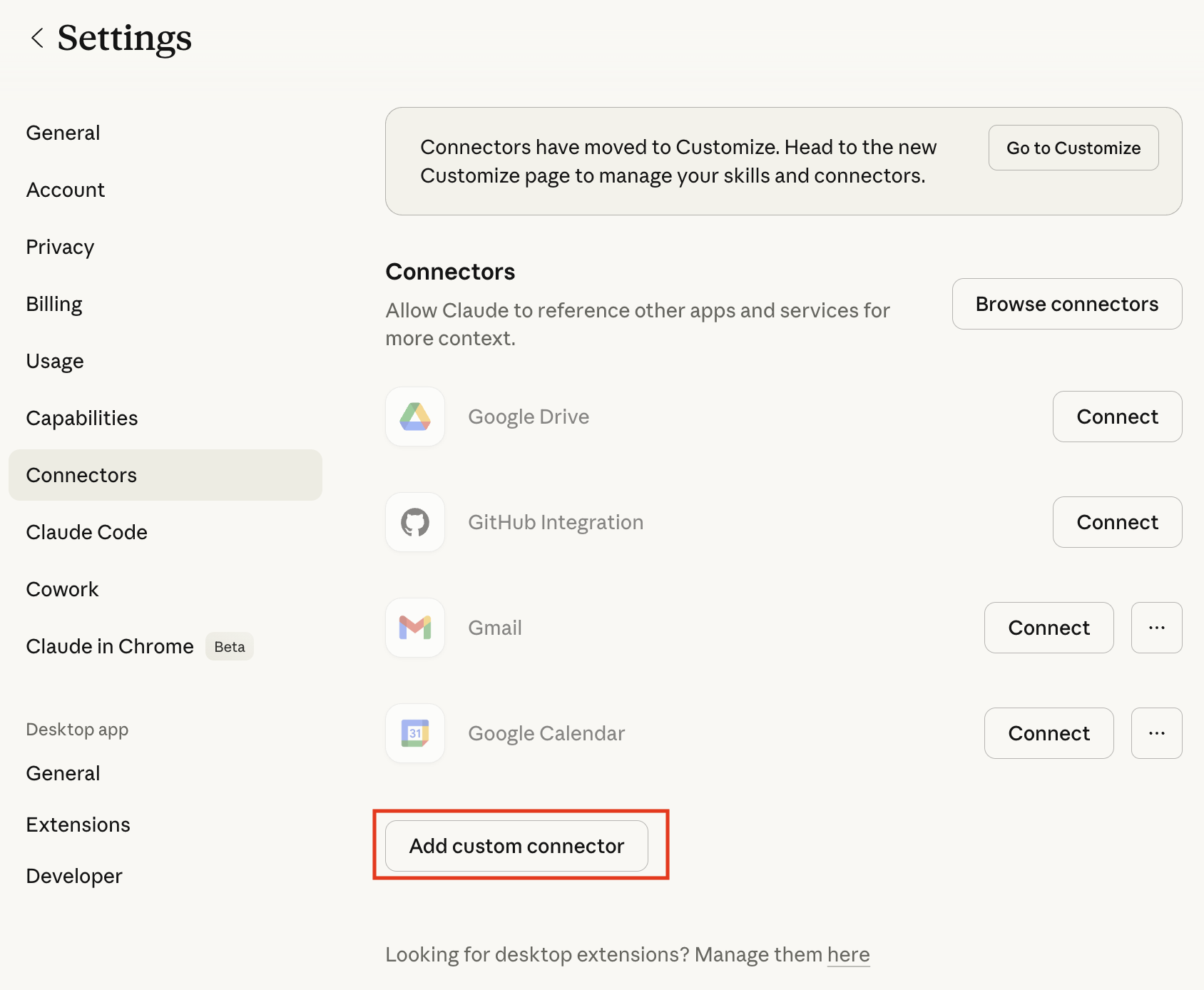
- Click Settings > Connecters.
- Click Add custom connector.
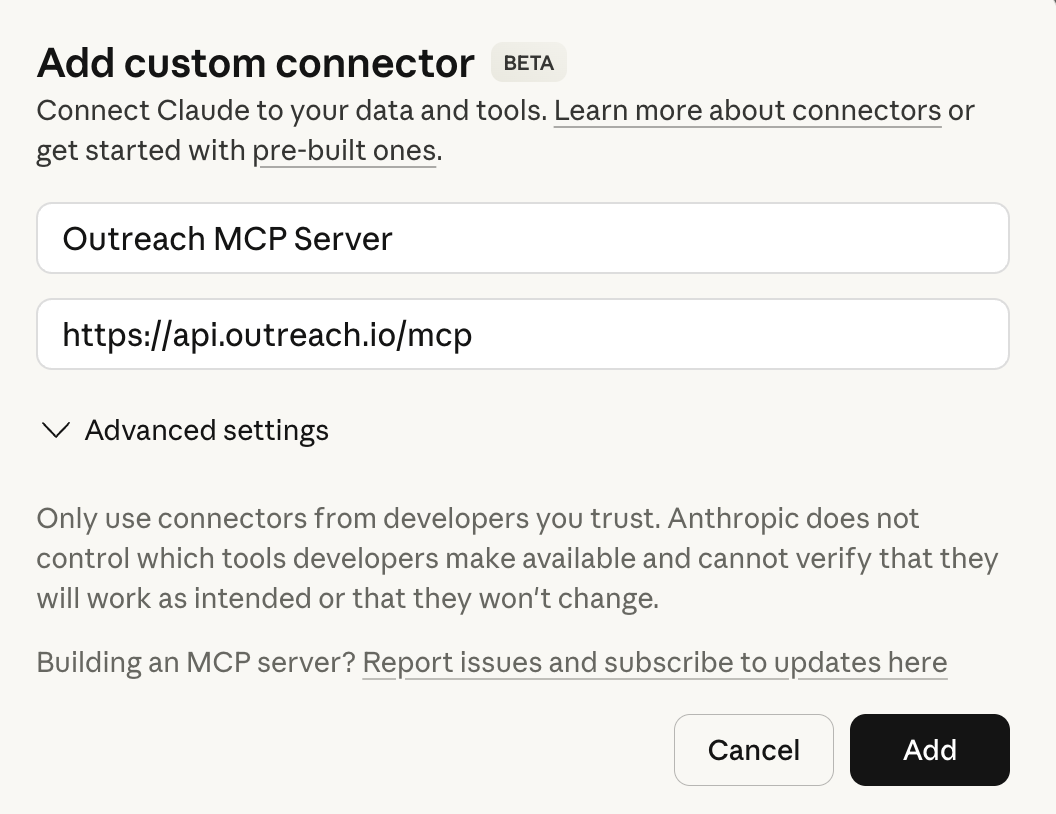
- Enter the following information:
- Name – Outreach MCP Server (or your preferred name)
- Server URL – https://api.outreach.io/mcp
- Click Add.
- Next to Outreach MCP Server, click Connect.
- Sign in to your Outreach credentials in the browser window. If you have multiple instances, make sure you're using the credentials the MCP Server of the organization you want to connect to.
- Complete authentication by providing multi-factored authentication if required by your organization.
- Once you have successfully authenticated, Outreach will prompt you to consent to the information that will be shared with Claude (or another MCP client if you're not using Claude)
Once you have authenticated and provided consent, Claude will be connected to Outreach MCP Server and will be ready for you to run some queries.
User Experience
MCP is a standalone protocol and can be utilized by any end user GenAI application that can support the protocol. This opens a whole world of possibility on how best to utilize Outreach's knowledge inside your daily workflows.
With GenAI, the most common experiences are either a chat based (user initiated) interaction or Agent to Agent autonomous collaboration. Let's look at those closely.
Chat Experience
Outreach MCP Server can be connected directly with GenAI (LLM) chat experiences within Agentforce, CoPilot, OpenAI etc. or your LOB applications, once you have set up the MCP clients. You can run queries as you would generally do as part of your daily revenue workflows and the chat should be able to connect automatically to Outreach MCP Server and display insights and knowledge from Outreach.
Note that from time to time, depending on your set up, your MCP Client might require additional authorization.
Outreach MCP Server comes with robust set of tools. Here are some sample queries you can run:
Prepare for meetings:
"Help me prepare for my next call with Acme"
Create content referencing conversations:
"Generate a best practice guide for each feature discussed in the last meeting with Acme"
Analyze what's working and why:
"What sequences from our customer conference have the best reactions, and what are they?"
Plan smarter objection-handling:
"Tell me Contoso's concerns around our solution and how I should combat that?"
Note that the quality of the response will be determined by the richness of data available to Outreach.
Agent to Agent Autonomous Collaboration
If you are running Agentic AI that is fully autonomous (for example, task completions, automatic workflow execution etc.), these agents can also utilize insights and knowledge from Outreach MCP Server as part of their flow.
From MCP point of view, these are fundamentally the same client-server communication as chat-based interaction. The key difference is that in this case the Agent will run fully autonomously.
Note that Outreach does not support Client Auth only clients. For security reasons, Outreach enforces that an active user credential, SSO or non-SSO, must be provided over MCP and the Profile assigned to that user account will be applied. If you plan to use Agentic Identity, that identity must be an active, licensed user in Outreach.
Outreach MCP Tools
Pro Tip: If you want to get detailed rundown on the latest tools, description or sample queries with request-response, you can always ask Claude, ChatGPT or another LLM you've connected to Outreach MCP Server. You can even ask it to create shareable materials to send around to your teams.
Outreach exposes the following tools:
- Workflow Tools:
- Retrieve transcripts from Kaia calls – fetch_kaia_meetings
- Retrieve email content – emails_search
- Lookup existing sequences – sequence_search_by_name
- Prospecting Tools:
- Lookup prospect by account IDs – prospect_get_by_id
- Lookup prospect by account name – prospect_search_by_name
- Lookup prospect by external IDs like CRM IDs – prospect_search_by_ext_id
- Account Tools:
- Lookup account by account IDs – account_get_by_id
- Lookup account by account name – account_search_by_name
- Lookup account by external IDs like CRM IDs – account_search_by_ext_id
- Ask general QnA and ask for Account insights – account_answer_question
- Deal Management Tools:
- Lookup opportunity by opportunity IDs – opportunity_get_by_id
- Lookup opportunity by opportunity name – opportunity_search_by_name
- Lookup opportunity by external IDs like CRM IDs – opportunity_search_by_ext_id
- Ask general QnA and ask for Opportunity insights – opportunity_answer_question
- User Tools:
- Lookup user by user IDs – user_get_by_id
- Lookup user by username – user_search_by_name
- Lookup user by user IDs like CRM IDs – user_search_by_ext_id
Exact configuration of the tools and sample responses can be found in our developer documentation. At this moment, Outreach has not exposed any resources or prompts.
We are always refreshing the list of available tools, so please keep an eye on this documentation for future enhancements.
MCP Client Availability
Any AI Application that supports MCP protocol, User level auth and Dynamic Client Registration, should be able to connect to Outreach MCP Server. Here are the instructions to connect the most popular clients:
- Claude – Available. Instructions are in this document above.
- ChatGPT – Available. Install as a custom connector.
- Microsoft CoPilot – Available. You can use it with Microsoft Copilot and Microsoft 365 Apps.
- Gemini – Available. Install through CLI.
- Development Tooling for major IDEs (like Visual Studio Code) – Available. Install through CLI or Config.
Our up to date listing can be found in Outreach Marketplace > MCP Connectors.
Data Security
Note: Every customer, IDP, user are different and there's no common deployment pattern Outreach can provide guidance on. These should not be treated as recommendations or guidance. Please ensure you follow your own security and access best practices.
Generally speaking, you can treat LLMs as another API end point, or client application, and secure the endpoint just as you would any other API endpoint or client application. MCP uses a HTTP endpoint, so you can use your web postures as a starting point. You can also follow general IAM best practices as they apply to OAuth2.1. Given below are some of the patterns:
Post-Auth Data Protections
Before sharing any data over MCP tools, Outreach enforces that the user must sign in, have an active user account and a valid license must be assigned to the user. Outreach also enforces any Outreach (RBAC) Profile assigned to the user, and the users will only be able to access data allowed through their Profile permissions, same as accessing Outreach through our web experience.
Pre-Auth Access Restrictions
If you want to enforce restrictions to access Outreach MCP Server before user has authenticated, Outreach has no control over that. Our recommendation instead is to follow your Identity Provider's (IDP's) best practices. If you want to enforce end point management use MDM and MAM tools. You can also apply any vendor specific policies.
Here are some of the things you could consider:
- Use your IDP Tools – Most IDPs will allow you to restrict access to a specific URL, control access to specific clients, users or employee groups.
- Use your MDM/MAM Tools – If you want to manage the client access endpoints, enforce data or account security policies, or enforce proxy restrictions MDM/MAM tools will help you to lock it down.
- Use AI vendor recommendations – Most popular AI Platforms will have their own security tools and guidance you could use. It might require specific licenses. Claude for example recommends Enterprise licenses, SSO restrictions and tenant restrictions you could use to manage Claude.
Note that Outreach MCP Server cannot distinguish between different deployments or change posture. It's up to you to test and verify Outreach MCP Server continues working, and all its tools are usable, post setting up restrictions.
Additional Information
Frequently Asked Questions
What is MCP in simple terms?
MCP (Model Context Protocol) is a universal language that lets AI agents and tools talk to each other across different platforms. It removes silos so systems can share context and take actions seamlessly.
How is MCP different from an API?
APIs are point-to-point connections between two systems. MCP is a shared protocol that enables many AI agents and platforms to collaborate dynamically without custom integrations. Think of MCP as interoperability of AI agents at scale.
Is MCP a product or a standard?
MCP is a protocol (a standard), not a standalone product. Outreach uses MCP to make its AI agents interoperable with other tools your customers already use.
Where can I find MCP clients I can use?
MCP allows you to use any compliant client to connect to servers and you are welcome to use any well-known MCP Clients. To try out Outreach MCP server, the fastest way would be to use Claude or ChatGPT. For more technically minded people, or if you don't want to pay for a client yet, you can use Visual Studio Copilot.
Outreach MCP Server really shines when the knowledge and insights show up in daily revenue flows. If your organization has access to Salesforce Agentforce, Microsoft Copilot, Google Gemini, they all support connecting to MCP Servers and provides an integrated experience. You can also use tools like Slack or Microsoft Teams if you want to use Outreach directly into your team selling communication workflows.
Some organizations might have restrictions on and might restrict usage of public MCP Clients. Your organization admin would be the best group to reach out to. At minimum your organization will need to enable MCP Server for your Outreach instance before you can use it.
Will MCP work with my existing tools?
Yes, as long as your tool can connect over MCP. MCP is designed for interoperability across platforms. Outreach will support major systems like Salesforce, Microsoft Copilot, and others at launch, with more partners added over time. If a customer's tools support MCP or have an MCP server/client, they can participate in this ecosystem without custom development.
How does Outreach pick the instance to get me knowledge and insights from?
Outreach uses the credentials you provide to connect to the appropriate Outreach instance, so make sure you're entering the credentials based on which instance you want to connect to. Most clients will open your default browser to authenticate you, so make sure that you're signed in with an appropriate Outreach account on your default browser before you sign in to a client.
Can a MCP client connect to multiple Outreach instances?
One client can only connect to one server per MCP protocol. However, you can create an MCP host to connect to multiple Outreach MCP servers if the host is able to maintain credentials from multiple accounts. This is not something Outreach controls and you'll need to refer to the documentation of your host AI Application.
Which version of MCP Spec does Outreach support?
For supported features, Outreach follows MCP's Authorization standards as published on November 11, 2025.
What is the pricing for MCP?
MCP Server is available to customers with Amplify. Once enabled by an admin, it is available to licensed and active users. API rate limits apply. If you're not sure if you have this or want to inquire about it, please reach out to your AE.
Why is the Enable MCP Server toggle greyed/grayed out in Org settings?
Make sure you have Amplify enabled for your organization and have enough credits. If you do not have the Amplify add-on package, please inquire about this with your AE if you're interested in adding it to your plan.
Does MCP support both manual and agentic workflows? Does it support technical or non-user identity?
Yes. MCP connectors work in both scenarios. MCP connectors support manual workflows, like sellers requesting actions via Ask Outreach, and agentic workflows, where AI agents use external insights, such as ZoomInfo or Crayon, to generate outputs like personalized emails.
MCP supports authentication using non-user identities, as long as a valid authentication token is provided. Outreach does not differentiate between human and non-human identities at the protocol level. However, the identity must still be associated with a licensed user in Outreach. Client credential–based authentication is not currently supported.
Are there any limits to usage?
Yes, API limits apply. Please check in with your Outreach partner if you are hitting API calling limits.
With MCP, are existing integrations like APIs, SDES and Snowflake Enrichment still relevant?
MCP is not designed to move large datasets or store third party insights inside Outreach. Customers still need traditional integrations like SDES and Snowflake Enrichment when they want their reps to see enriched data directly inside Outreach when they want enrichment to run automatically at scale, and when they want permanent fields populated for reporting or workflows. Customers can continue to use APIs to pull data inside their existing workflows.
MCP connections are ideal for letting agents fetch just-in-time context from another system, generate guidance, and take action across platforms. These agent-to-agent interactions do not replace the value of persistent, visible, governed data inside Outreach.
How can MCP access be controlled using roles or profiles?
MCP access follows existing role and profile permissions in Outreach. Data accessed through MCP is governed by the same permissions assigned to each user, making it straightforward to limit access for specific users or groups using standard profile configuration.
If you want exactly the same access control on Server and Client, make sure you have the same permissions applied on both Server and Client.
Can a specific user's MCP access be revoked?
Yes but not through Outreach. Access can be revoked by an admin through the organization's Identity Provider (IDP). Once revoked, the user or system will no longer be able to authenticate or access Outreach via MCP. Please consult your IDP documentation for secure or conditional access.
How many MCP calls are used with one query?
MCP server calls are dependent on the agent used and how it reasons. Here's how this will work (using Claude as an example):
- User enters a query like "Help me prepare for my next call with Acme" into Claude
- Claude reasons to understand if it has enough context to respond
- Claude reasons that it'll need help from Outreach
- Claude asks Outreach via MCP
- API call 1: Hey can you provide me details you have on Acme Account
- API call 2: Hey can you provide me details you have on Acme Opportunity
- API call 3: Hey can you provide me details on champion John Doe Prospect
- API call 4: Hey can you provide me a list of calls that happened between days X-Y
- API call 5: Hey can you provide me details on any emails that got sent to Acme Account, Opportunity, Prospect
- And so on...
So the number of API calls made is highly dependent on how Claude reasons. Which will be dependent on Claude itself and how the customer has configured Claude or their agent.
Each API call that Claude or an Agent makes will be counted as 1 API call to Outreach MCP endpoint. The actual number of calls is non-deterministic and Outreach can't predict or provide firm guidance on it.
When searching Kaia meetings via MCP, is access limited to meetings the user is involved in?
Yes. Access is governed by the user's profile permissions. Users can only search and retrieve meetings they are authorized to view based on their assigned permissions.
Was this article helpful?
That’s Great!
Thank you for your feedback
Sorry! We couldn't be helpful
Thank you for your feedback
Feedback sent
We appreciate your effort and will try to fix the article