Objective
Set up and utilize Smart Data Enrichment as an Outreach Admin. This feature offers Sellers on the Outreach platform with third-party enriched data by enabling connectivity and configuration for data from specialized data providers.
Applies To
- Outreach Admins
- Platform Integrations
- Account and Prospect Management
- Revenue and other AI Agents
Before you begin
- Two primary personas can configure and utilize the feature:
- The Admin configures the connector. (This article describes these procedures.)
- The Seller/Sales Ops persona creates visibility and sets up actions based on the data.
- This feature requires the Amplify package.
Procedures
Connect enrichment provider
To use data enrichment in Outreach, you first need to connect one or more enrichment providers to your organization.
Each provider is surfaced dynamically via the extensibility framework, ensuring that only Outreach-approved, compliant providers are listed.
The following providers are supported:
ZoomInfo: Supports core enrichment like firmographics, contact data, and key signals such as funding and job changes.
The data categories available are:
- Companies/Accounts — Firmographics, Tech Stack, Competitors, Departments, Funding Rounds
- Prospects — Demographics, Email Addresses, Phone Numbers, Current Employment
- Signals — Funding Round, Intent Topics, Website Visits, Anomalous hiring, New award, Intent competitor spike, CXO change, Divestiture, Earnings, G2 visit, Intent spike, IPO offering, Senior job postings, Layoffs, Mergers and acquisitions, Pain points, New partnership, New product launch, Podcast mentions, Scoops, New technology, Web form complete, New deal won.
SalesIntel: Strong in firmographics and demographics data, contacts, and key signals such as funding and job changes.
The data categories available are:
- Companies/Accounts — Firmographics, Tech Stack, Competitors, Leadership, Departments, Funding Rounds
- Prospects — Demographics, Email Addresses, Phone Numbers, Current Employment
- Signals — Joined Company, Funding Round, IPO Announcement, Acquisition, Acquired
LeadIQ:
The data categories available are:
- Companies/Accounts — Firmographics
- Prospects — Demographics, Email Addresses, Phone Numbers, Current Employment
To connect a new provider:
- Log in to Outreach as an Admin.
- Go to Administration > Integrations > Data enrichment.
- Click Connect provider.
- Select the provider from the list.
- Authenticate using one of the supported methods
- API key: Input and securely store your API key.
- OAuth: Complete OAuth-based authorization flow.
Once connected, Outreach will validate the credentials and confirm successful connection status.
Configure Enrichment Settings
Once an enrichment provider is connected, admins can configure how that provider is used within their Outreach instance from the Enrichment settings tab. This ensures the right data is sourced from the right provider, at the right cadence, and within limits.

Data Provider Assignments
Admins can assign specific providers to individual data categories (e.g., firmographics, job postings, leadership). This allows fine-grained control over which provider enriches which type of data maximizing coverage and ROI across the licensed sources.

To assign provider to a specific category:
- Log in to Outreach as an Admin.
- Go to Administration > Integrations > Data enrichment > Enrichment settings.
- Select either Accounts or Prospects.
- Next to the desired category, click the 3 dots context menu icon.
- Select the desired provider.
Assign provider to find new records
For net-new prospecting, admins can assign a specific provider to support Identify requests. These requests allow Outreach to fetch brand new prospects that match predefined ICP filters (e.g., industry, headcount, geography).
The ability to find new prospects with target accounts and sync them to Outreach is available from the Revenue agent.
To assign provider to for finding new records:
- Log in to Outreach as an Admin.
- Go to Administration > Integrations > Data enrichment > Enrichment settings.
- Select Prospects.
- Click New record sourcing.
- Select the provider you want to use for sourcing new records.
New records can be sourced via Revenue agents. To learn more about Revenue agents, please visit here.
Field update rules
Outreach supports granular control over how enriched values update existing fields in the following categories:
- Demographics
- Firmographics
- Phone numbers and Email addresses
Options include:
- Always overwrite: Replace existing values with enriched data.
- Conditional overwrite: Populate only when the field is currently blank or previous value was provided by the data enrichment.
- Do not update: Field is not updated.
To configure field update types:
- Log in to Outreach as an Admin.
- Go to Administration > Integrations > Data enrichment > Enrichment settings.
- Select either Accounts or Prospects.
- On the relevant data category row, click the 3 dots context menu icon > Configure fields.
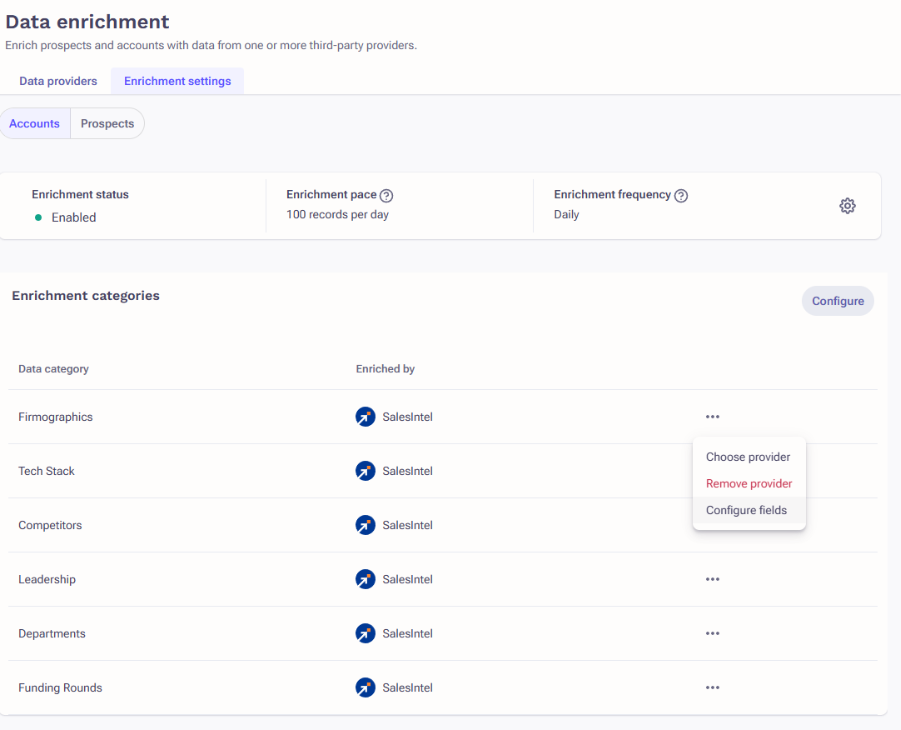
- In the resulting window, configure as needed.
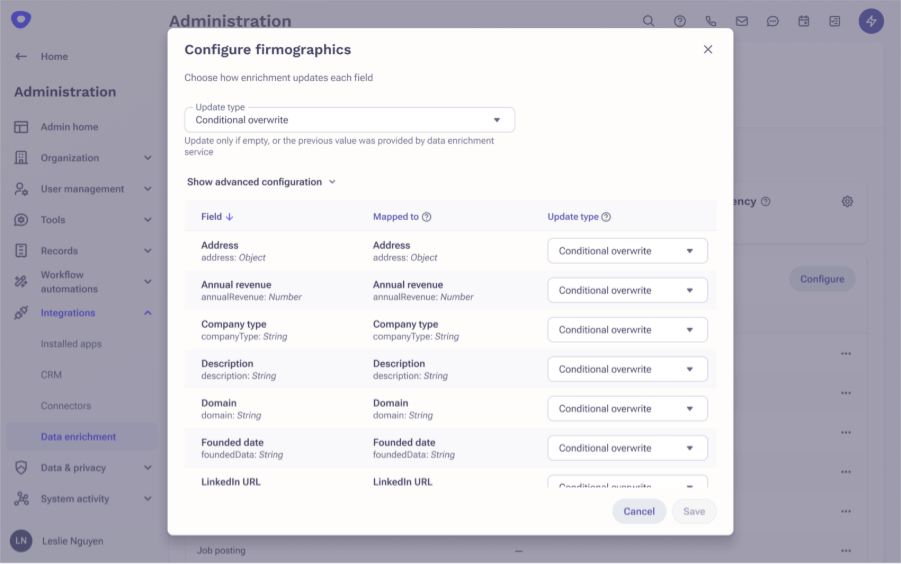
- Click Save when complete.
Enablement & Usage Controls
Once providers are configured, organizations can enable enrichment in their org by setting rules that control how often and how much data is enriched.

Enrichment status
Admins can enable or disable enrichment globally for each object type (Accounts, Prospects). When disabled, no enrichment jobs will run, including both automated (AI Agents) and manual enrichment.
Enrichment pace
Define maximum numbers of records that can be enriched daily. This helps manage usage relative to data provider contracts or internal policies.
Enrichment frequency
Set how frequently enrichment data on Prospects and Accounts should be refreshed. Options include daily, weekly, monthly, or never. This helps optimize for freshness vs. cost.
To enable data enrichment and configure its frequency and cadence:
- Log in to Outreach as an Admin.
- Navigate to Administration > Integrations > Data Enrichment > Enrichment Settings.
- Select either Prospects or Accounts.
- In the Enrichment Configuration section, click the cog icon.
- In the modal dialog, adjust the enrichment settings as needed.
Was this article helpful?
That’s Great!
Thank you for your feedback
Sorry! We couldn't be helpful
Thank you for your feedback
Feedback sent
We appreciate your effort and will try to fix the article