Objective
The purpose of this article is to provide direction to Outreach users in archiving and unarchiving sequences in Outreach.
Archiving a sequence removes the sequence from the Sequence Overview page. Archiving a sequence is not the same as deleting; archived sequences can be restored, deleted sequences cannot be recovered.
Applies To
- Outreach Users
- Sequences
Note
- If the sequence is enabled when it is archived, Prospects will continue through the sequence steps; if the sequence is disabled, Prospects will not move through the sequence.
- Archiving sequences falls under editing sequences governance settings, if you are seeing this error message 'Not authorized to perform this action', reach out to one of your Outreach Admins, they should be able to archive the sequence for you.
Procedures
Archive a Sequence
- Access the Outreach Platform.
- Click Content > Sequences.
- Click the More Options icon to the right of the sequence.
- Select Archive from the More Options dropdown menu.
Archive Multiple Sequences
- Access the Outreach Platform.
- Click Content > Sequences.
- Click to select the applicable sequences.
- Click the Manage Sequences icon (padlock) and select Archive from the dropdown menu.
- Click Confirm on the Archive Sequences confirmation popup.
- Click Done.
Restore Archived Sequences
- Access the Outreach Platform.
- Click Content > Sequences.
- Click add filter.
- Add State is Archived as a filter.
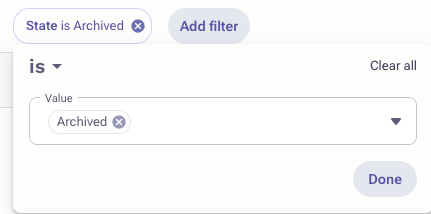
- Click to select the applicable sequences.
- Click the Manage Sequences icon (padlock) and select Unarchive from the dropdown menu.
- Click Confirm on the Restore Sequences confirmation popup.
- Click Done.
The sequences are now ready for use.
Note: Perform the same steps for any single or multiple sequences as applicable.
Additional Information
Was this article helpful?
That’s Great!
Thank you for your feedback
Sorry! We couldn't be helpful
Thank you for your feedback
Feedback sent
We appreciate your effort and will try to fix the article