Objective
The purpose of this article is to provide information to Outreach users about tracking the forecast movement.
The Forecast Movement chart provides a waterfall visualization to track deals that have been moved, slipped, pulled in, lost, won, etc. within the selected time period & sales period.
Applies To
- Outreach Users
- Sales Reps
- Sales Managers
- Sales Leaders
Before You Begin
- Forecast Movement chart is supported only for opportunity forecasts with either monthly or quarterly period.
- The chart supports the current & last sales period.
Overview
Sales managers and reps can analyze and visualize the reasons for forecast metric value changes—deals slipped, pulled in, moved, lost, won, etc.—using a waterfall chart to make accurate forecast adjustments.
You can click on different buckets to see the respective opportunity list.

Bucket Types
| Type | Definition |
|---|---|
| Slipped | Opportunities that had a close date within the sales period at the start of the time window, but by the end had been updated to a close date after the sales period. |
| Lost | Opportunities that were marked closed and lost by the end of the selected time period. |
| Won | Opportunities that were marked closed and won by the end of the selected time period. |
| Moved | Opportunities that no longer fit the selected forecast metric criteria and are still open. |
| Amount Increased | Opportunities for which amount increased by the end of the selected time period. |
| Amount Decreased | Opportunities for which amount decreased by the end of the selected time period. |
| Added | New opportunities that were created within the selected time period, or existing opportunities that now match the forecast metric criteria and are still open. |
| Pulled In | Opportunities that were set to close in the future, but were pulled into the selected sales period. |
Time Period Selector
You can click on the time period selector on the chart and select either one of the standard date ranges or a custom date range.

Standard Date Ranges for a Quarterly Forecast
- Month 1
- Week 1
- Week 2
- Week 3
- Week 4, etc.
- Month 2
- Week 6
- Week 7, etc.
- Month 3
- Week 11
- Week 12, etc.
- Quarter to Date
Standard Date Ranges for a Monthly Forecast
- Week 1
- Week 2
- Week 3
- Week 4
- Month to Date
Notes
- Time range is bound by the selected sales period.
- Weeks grouping is considered from Mon–Sun.
Metric Selector
You can click on the metric selector and select the metric for which you would like to track the movement.

The list of metrics that will show is configured by admin in trends setup for a forecast.
Note: Only auto-calculated non-formula metrics are supported for the waterfall chart.
Customize Columns for Forecast Movement Chart
Admins can select the specific fields—including custom fields—that appear in the movement table.
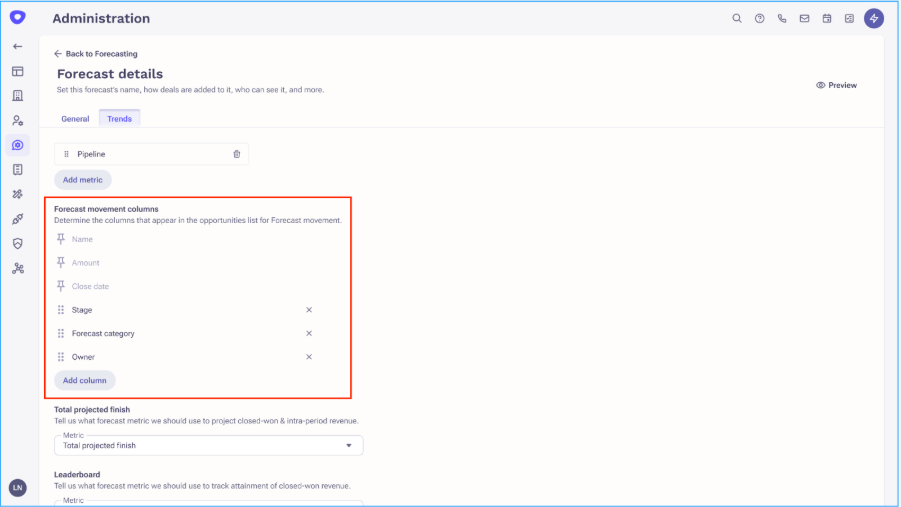
Note: Amount & Close Date fields will be reflected as per the metric configuration of the selected metrics on the chart.
Was this article helpful?
That’s Great!
Thank you for your feedback
Sorry! We couldn't be helpful
Thank you for your feedback
Feedback sent
We appreciate your effort and will try to fix the article