Objective
You are importing a prospect CSV file in Outreach using the Bulk Create workflow. You want to also assign and associate an account/company to the prospect(s), so the prospect and account are linked in the Outreach system.
Applies To
- Users that are have an assigned Governance Profile that is permitted to create prospects in bulk using a CSV upload.
- If you do not have/see these permissions, please reach out to your Admins for assistance.
- Bulk Create / Import CSV workflow
- This can be done from either the Administration Settings > Imports page, or by clicking on the quick-actions bolt icon in the top right and clicking Bulk create.
- Here is a direct link to the Imports & Bulk Create workflow.
Procedure
- Make sure the accounts already exists in the system as an Account record. The prospect CSV file does not automatically create new account records. The system cannot assign and associate a prospect to an account in this workflow if the account doesn't exist yet.
- Click on the quick-actions bolt icon in the top right.
- Click on Bulk create.
- Click the Prospects CSV option.
- Find and choose your prospect CSV file that you want to upload.
- Click Next.
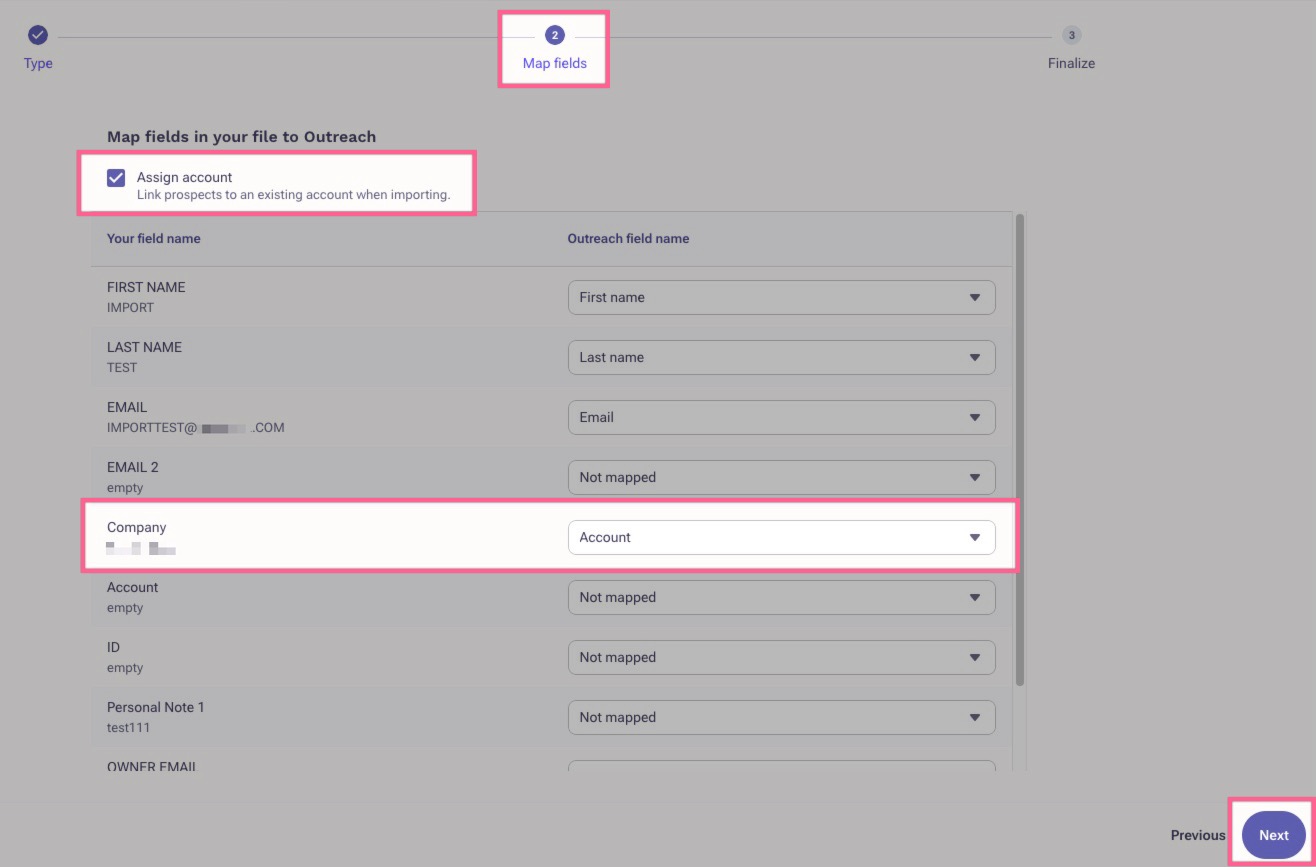
- Toggle/check the Assign account option at the top.
- Map your Account/Company column field to the Outreach field name Account or Account name.
- Click Next and complete the rest of the Import workflow.
Additional Information
How To Bulk Create Prospects and Accounts in Outreach via .CSV File
Was this article helpful?
That’s Great!
Thank you for your feedback
Sorry! We couldn't be helpful
Thank you for your feedback
Feedback sent
We appreciate your effort and will try to fix the article